


LITPro - GPS Lap Timer
4.511.00 Reviews
App Specs
- Version
- 3.13.35
- Updated On
- License
- Free
- Downloads
- 10,000+
- Developer
- NZN Labs Inc.
- Categories
- Sports
- Platform
- Android
Screenshots

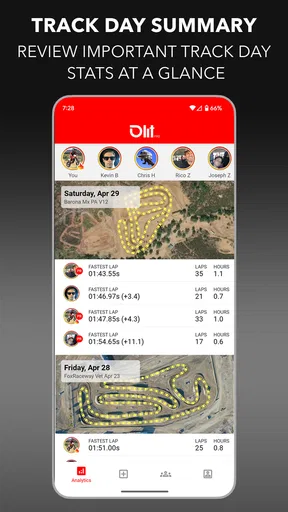
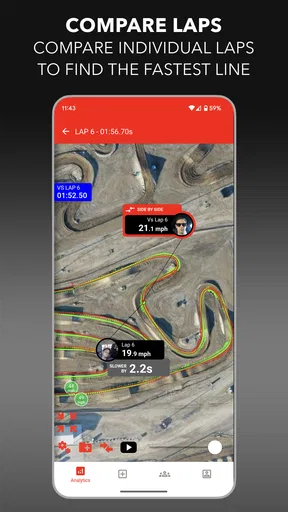
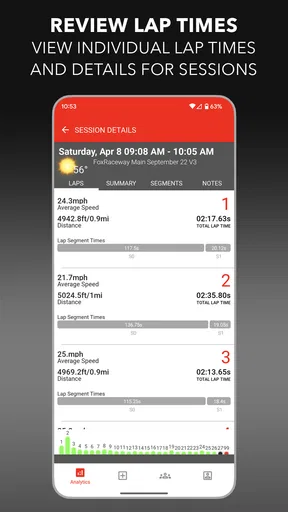
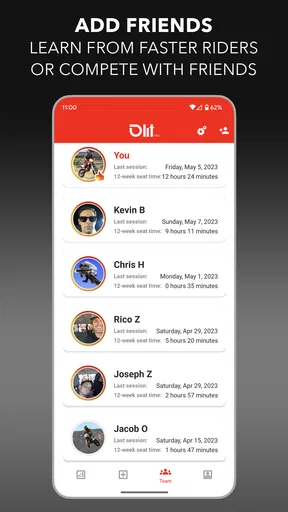
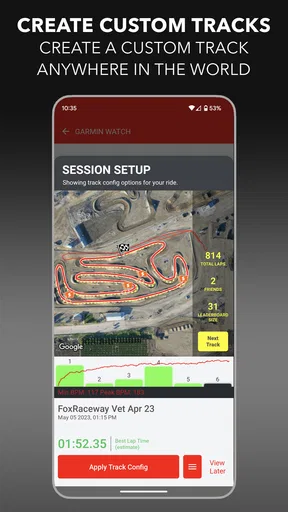
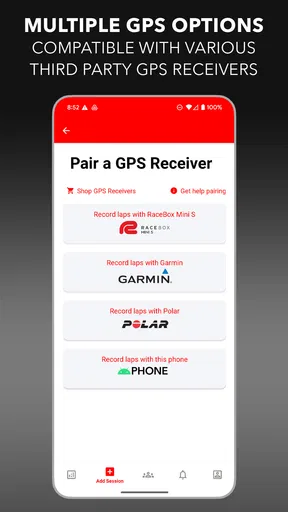
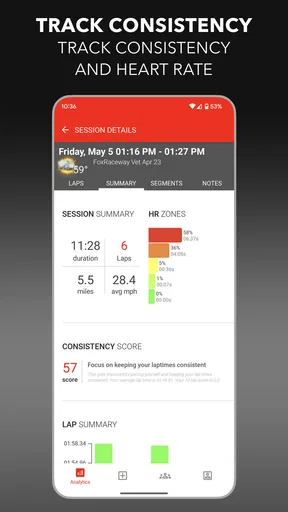
 Analysis by AppCompare
When I want to improve on a circuit, I usually need more than a stopwatch and a vague feeling that one lap was better than the last. LITPro is built for that exact starting point: it turns an Android phone into a GPS lap timer and a personal riding coach. I found it most useful when I treated each session as a small experiment rather than simply recording a ride. The goal was not just to collect laps, but to leave the track knowing what I should try differently next time.
That focus makes this a distinctive sports app. It is not a general fitness tracker, a social feed, or a replacement for dedicated motorsport hardware. Its value comes from putting timing and riding feedback in the same pocket-sized tool. The app is free to install, aimed at Everyone, and developed by NZN Labs Inc. It has a 4.5 average from around 150 ratings, with over 10 thousand installs, so it has a modest but real user base rather than the reach of a mainstream training platform.
From preparing the ride to learning from the result
Before I head out, I like to decide what I want the session to teach me and make sure the phone is secured and ready while I’m still stationary. That small bit of preparation keeps attention where it belongs once riding starts, and it makes the first laps a useful check rather than a scramble. The next step is turning those laps into a result I can interpret.
Starting with the right expectation
The first decision is whether a phone-based GPS timer matches the kind of riding I am doing. For casual track-day practice, personal benchmarks, and learning a circuit, it makes sense. I can focus on consistency without buying a separate timing device before I know how seriously I want to pursue the hobby. For official competition, where timing accuracy, approved equipment, and dependable data handling matter, I would not rely on a smartphone app as my only source of truth.
That distinction is important because GPS timing feels precise even when the conditions around it are not. Phone placement, signal quality, battery condition, and the surrounding environment can all affect the experience. I therefore use the app to compare my own sessions under similar conditions, not to treat every displayed difference as an unquestionable measurement. A small improvement is more convincing when it appears repeatedly across several laps.
Before riding, I would also decide what question the session is meant to answer. Am I trying to become more consistent? Am I testing a braking change? Am I learning where I lose time? This simple step prevents the common mistake of opening a lap timer, riding without a plan, and then staring at numbers that do not suggest a useful next action.
A practical setup before leaving the pit
My preferred workflow starts before the bike moves. I make sure the phone is secure, visible enough to operate safely when stationary, and positioned where it will not distract me. I avoid making last-second changes once I am on track. The app can only help if the phone remains available to record the session, so preparation matters more here than it would with a basic stopwatch.
Worth Reading Before You Choose

Flipboard Shows What News Apps Must Do Beyond the Feed

Switching to Android Auto Means Rethinking Your Driving Routine

Google Calendar Makes a Crowded Week Easier to Manage

Ludo King Makes the Most of the Minutes Between Plans

Baby Panda World Brings Quick Play to Modern Phones, but Its Game Library Feels Busy

ESPN’s Live Game View Makes Following Close Games Easier
I would begin with a short check that the app is ready to recognize the circuit and record a session. If I were visiting an unfamiliar track, I would allow extra time for this rather than assuming the first flying lap will be perfect. A warm-up lap can be valuable for confirming that the session is being captured and for settling into the layout before I start judging pace.
There is also a useful mental handoff at this point: the phone handles collection, while I handle riding. I do not want to interact with the screen during a fast lap. The safest and most productive approach is to start the recording when stationary, put the phone away, and let the app do its job until I return to the pit or finish the session.
Running a session instead of chasing one lap
Once the riding begins, I treat the first laps as orientation. I am checking whether the track is being identified correctly, whether the phone is staying in place, and whether my pace is settling. This is especially helpful for a first visit, because a rushed attempt to set a personal best immediately can produce a number without producing understanding.
After that, I use repeated laps to create a comparison. I try to keep one variable in mind, such as carrying a little more speed into a corner or being smoother on the exit. Changing several things at once makes the result difficult to interpret. This is where the personal-coach idea becomes practical: the app supplies the timing context, but I supply the disciplined test.
A realistic example would be a rider with a free afternoon and a motorcycle that feels quick in some corners but inconsistent in others. Rather than pushing on every lap, I could spend the first part of the session learning the circuit, then use a few laps to establish a comfortable reference. In the next group, I would concentrate on one corner sequence, and afterward compare the session with the earlier baseline. Even if the overall time barely changes, a more repeatable pattern can show that the technique is moving in the right direction.
Turning lap data into a coaching conversation
The strongest part of the workflow comes after the riding, when I stop treating the app as a scoreboard. A lap time tells me that an outcome changed, but it does not automatically tell me why. I use the result as a prompt to remember what I felt: Did the bike run wide? Did I hesitate at the braking point? Did traffic interrupt the lap? Was the improvement caused by a cleaner line or simply a more open track?
This combination of memory and recorded timing is more useful than either one alone. My memory can exaggerate a dramatic lap, while the number can hide the reason behind it. Looking at both helps me separate a genuinely repeatable improvement from a lucky clear lap.
A non-obvious advantage of this approach is that it encourages a better definition of progress. The fastest lap is not always the best training result. If several laps cluster closely together, that may be more valuable for a developing rider than one isolated quick attempt followed by mistakes. I would rather finish with a dependable pace and a clear next exercise than with a single impressive number I cannot reproduce.
Handing the result to the next session
The final handoff is from the app back to my own notes and decisions. After stopping the session, I would record the one or two changes that seemed worthwhile, along with anything that made the comparison unreliable. For example, traffic, a changing surface, or a late start can explain why two sessions should not be compared too literally.
This is also where I decide what not to change. If a session was already consistent, I would avoid transforming it into a long list of corrections. A good training loop needs a manageable next step. The app supplies a repeatable reference, and I carry that reference into the next outing instead of starting from memory every time.
For riders who share a bike or train with friends, the handoff can be useful in a different way. One person can operate the phone between sessions while the rider concentrates on preparation and recovery. The app does not replace a coach standing at the circuit, but it can give a conversation something concrete to discuss. “That felt faster” becomes a starting point for checking whether the session actually supported that impression.
What makes it different from the usual alternatives
The obvious alternative is a traditional stopwatch. A stopwatch is simple, quick, and often adequate for a basic personal challenge, but it leaves more of the recording and comparison work to me. LITPro is more appealing when I want the phone to connect timing with a broader riding routine rather than merely display a start-and-stop result.
Another alternative is a dedicated GPS lap timer or a larger motorsport data system. Those options may be preferable to a phone when I need specialized hardware, stronger consistency, or a setup designed around serious competition. Their trade-off is cost, complexity, and another device to mount, charge, and learn. LITPro occupies the more approachable middle ground: it lets a rider begin with equipment already likely to be available.
It also differs from general sports and fitness apps. A running tracker or cycling app may be excellent for distance, routes, and broad exercise trends, but circuit riding needs a different rhythm. Repeated laps, reference times, and corner-by-corner concentration matter more than a simple total-distance summary. LITPro makes sense when the track itself is the center of the session.
Where the workflow breaks down
The biggest limitation is the phone dependency. If the device is poorly mounted, overheats, loses signal, runs low on battery, or becomes difficult to access safely, the entire chain from input to result becomes weaker. This is not a criticism unique to one screen; it is the unavoidable compromise of using a smartphone instead of purpose-built equipment. I would test the mounting position and recording routine during a low-pressure session before trusting it on an important day.
There is also a learning curve in interpreting the output responsibly. A new rider may expect the app to point directly to the exact mistake and prescribe a perfect correction. A lap timer can support coaching, but it cannot feel the bike, observe body position, understand traffic, or know whether a rider was tense. If I wanted detailed technique instruction, I would pair the app with an experienced instructor rather than expect software alone to provide the complete answer.
Another point to consider is the payment model. The app is free, but optional in-app purchases range from $4.99 to $11.99 per item. That makes it easy to try without committing upfront, although I would look carefully at which capabilities are included before building my entire workflow around it. A free starting point is helpful, but the eventual value depends on whether the available paid additions match the kind of riding I actually do.
Device compatibility is also practical rather than glamorous. The current version is 3.13.35 and requires Android 8.0 or later. That covers many phones, but anyone using an older device should check compatibility before planning a track day around it. I would also avoid updating or changing the setup immediately before an important session; a familiar, tested configuration is worth more than a last-minute improvement on paper.
Who will get the most from it
I would recommend LITPro to a rider who wants structured feedback without immediately purchasing dedicated timing hardware. It suits someone who attends occasional track days, is learning a familiar circuit, or wants to turn vague impressions into repeatable comparisons. It can also help a technically minded rider organize practice around one change at a time.
It is less suitable for someone who only wants a casual ride summary, because the lap-focused approach may be more detail than necessary. I would also steer a professional racer or a rider who needs formally trusted timing toward equipment and systems designed for that level of demand. Likewise, anyone unwilling to secure and manage a phone around a motorcycle should choose a simpler or more specialized solution.
For a beginner, I would use it conservatively. The app should encourage observation and consistency, not pressure to ride beyond personal limits for a better number. The safest workflow is to set a comfortable pace, review the result afterward, and make changes gradually. A slower session that teaches something useful is still a successful session.
My overall experience and recommendation
What I like most is the way LITPro gives a casual track-day habit some structure. Starting with a question, recording a controlled session, reviewing the outcome, and carrying one lesson forward is a much better use of lap timing than chasing numbers without context. The app’s role is modest but useful: it helps connect riding effort to a result I can revisit.
I would not describe it as a complete replacement for a coach, a dedicated data system, or careful riding technique. Its usefulness depends on preparation, sensible interpretation, and a phone setup that works reliably. Those conditions are real friction, and they matter more when the stakes or speed increase.
Still, for a rider who wants to experiment before investing in specialist equipment, the free entry point is attractive. NZN Labs Inc. has positioned this Sports app around a clear need, and the 4.5 average suggests that its basic idea resonates with users. My recommendation is to try it during an ordinary practice day, use the first session to validate the workflow, and judge it by whether it helps you make a better next decision—not merely whether it displays a quicker lap.
In that role, LITPro is at its best: not as a magic instructor, but as a practical bridge between what I feel on the bike and what I can learn after the session. If that is the gap you are trying to close, it is worth considering.
Pros
- Accurate GPS timing helps track laps without dedicated track hardware.
- Supports detailed performance analysis for comparing laps and sessions.
- Useful for drivers
- riders
- and other motorsport enthusiasts.
- Live timing feedback makes it easier to monitor progress on track.
- Can help identify consistency issues and areas for improvement.
Cons
- GPS accuracy may vary with signal strength
- weather
- or track surroundings.
- Continuous location tracking can drain the phone battery quickly.
- A secure phone mount is needed for safe and reliable use while driving.
- Some advanced features may require a paid subscription or in-app purchase.
- The app may be less useful on tracks without reliable GPS mapping or coverage.
FAQs for LITPro - GPS Lap Timer
What is LITPro - GPS Lap Timer used for?
LITPro - GPS Lap Timer is designed for motorsport and track-day enthusiasts who want to record, analyze, and improve their driving performance. It uses your device’s GPS to measure lap times, sector performance, speed, distance, and other driving data. The app can help you compare laps, identify slower sections, and monitor progress during repeated sessions on a circuit.
Does LITPro - GPS Lap Timer work without an internet connection?
Many of the app’s core tracking functions can generally be used at a circuit without a constant internet connection, provided the GPS signal is available and the necessary track information has already been downloaded or configured. However, features such as account synchronization, cloud storage, updates, or sharing may require internet access. It is best to prepare the app before arriving at the track.
How accurate is the lap timing in LITPro - GPS Lap Timer?
Lap-timing accuracy depends on several factors, including the quality of your phone’s GPS receiver, satellite visibility, device placement, track configuration, and whether an external GPS sensor is used. A phone can provide useful timing for practice and comparison, but dedicated GPS hardware may deliver more consistent results, especially for serious racing, detailed telemetry, or professional-level analysis.
Can LITPro - GPS Lap Timer track more than lap times?
Yes. In addition to recording lap and sector times, LITPro is intended to provide a broader view of your session, including speed-related information, track position, distance, and performance comparisons. Depending on the device, subscription, connected hardware, and available app features, users may also be able to review recorded sessions, analyze driving data, and compare laps to find areas for improvement.
What should I check before using LITPro at a race track?
Before starting a session, make sure your phone has sufficient battery, location services are enabled, and the app has permission to access GPS data. Secure the device where it can receive a clear satellite signal without distracting you while driving. Select the correct circuit and verify the start-finish position if required. Always follow track rules and never operate the phone manually while the vehicle is moving.


